My son just had his double-digit birthday and he continues to amaze me every day. That boy just loves to create things and he’s always making me proud to be his dad.
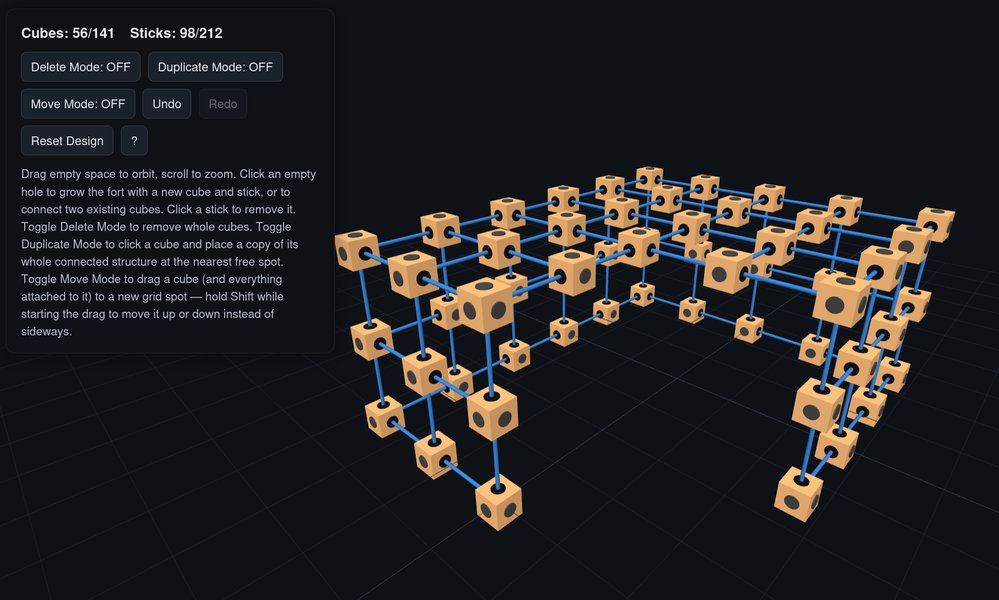
So today I walk in on my kids counting all the pieces they had from the Stick Fort project. They typically build a new fort every Saturday for Family Movie Night, so seeing them tear down the old fort and build a new one up is very common. However, they weren’t building this time. They were taking inventory so my son could build an app.
He was excited to show it off today and was looking for input on how to make it better. It’s a 3D fort building simulator. He hasn’t actually named it, but for this post, let’s call it FortCad. The current version won’t let them use more than the rods and connectors they actually have, and it also visualizes physical limitations like unsupported overhangs and potential sagging issues. It’s amazing that kids have these tools at their disposal. All we had were AOL discs with increasing hours of usage - Kachunk kathunk eeeeeeeeeee.
Tonight's fort visualized in 'FortCad'
Ever since I taught him the basics of Python, JavaScript, HTML, CSS, and the Linux terminal, his creativity has shot through the roof. AI agents have been part of that too, not doing the work for him, but there as a tool to teach and guide him along the way, so he can build almost anything on his own now. He sees the world differently now. If there’s a problem or something he wants, he just builds it.
For example, he loves those simple yet fun internet games like The Impossible Game, chess games like Gambonanza, and The Duck Game, so he just makes his own versions when he wants to play them. He built his own proper chess game from scratch, then skinned it with Spider-Man and Mario sprites pulled straight from the original NES games, since he’s really into both right now. He makes a lot of these just to have around, and half the time he’s not even playing what he built. He’s focused on tweaking, adding features, and making things better. He’s a little version of me - just cuter, smarter, and with more energy. Oh, and I taught him Photoshop too, which is how the sprite work happened.
Kids are amazing at this age. They’re like little sponges that absorb everything you throw at them. The trick is getting them to focus.
Father’s Day
Last week was Father’s Day, and I got some nice cards from the kids.
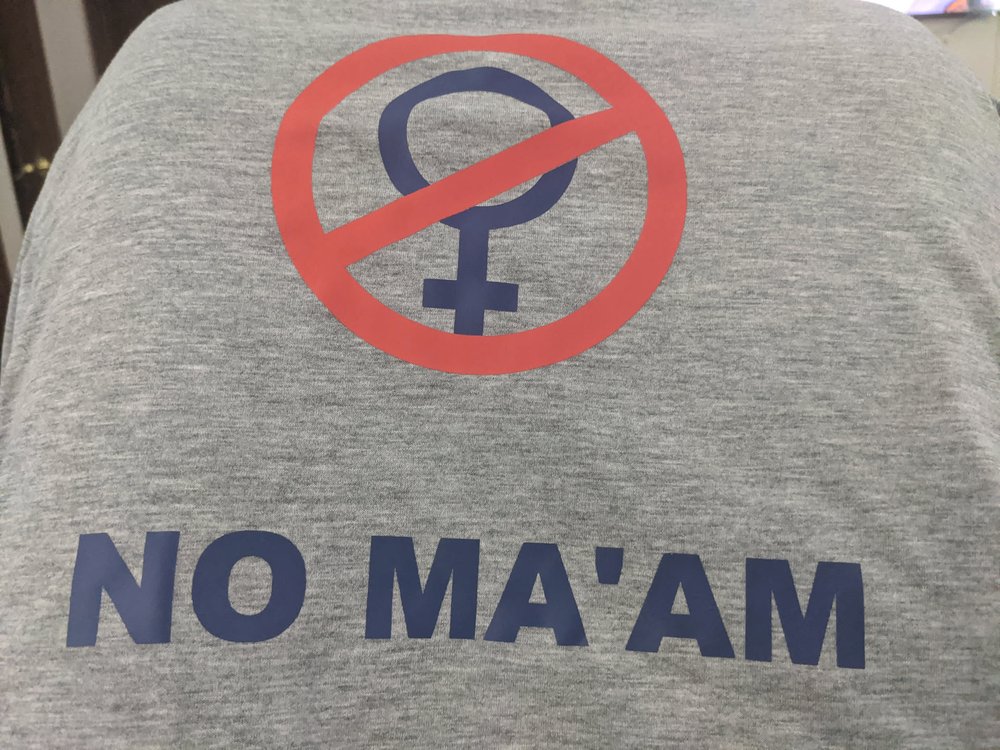
National Organization of Men Against Amazonian Masterhood
My wife made this for me and if you get the reference, we will be instant friends. Doubtful I’ll wear this one to work though. Google and I don’t exactly share the same sense of humor anymore. Anything considered fun or humorous was unceremoniously removed in late 2015 - much like their “Don’t Be Evil” motto.
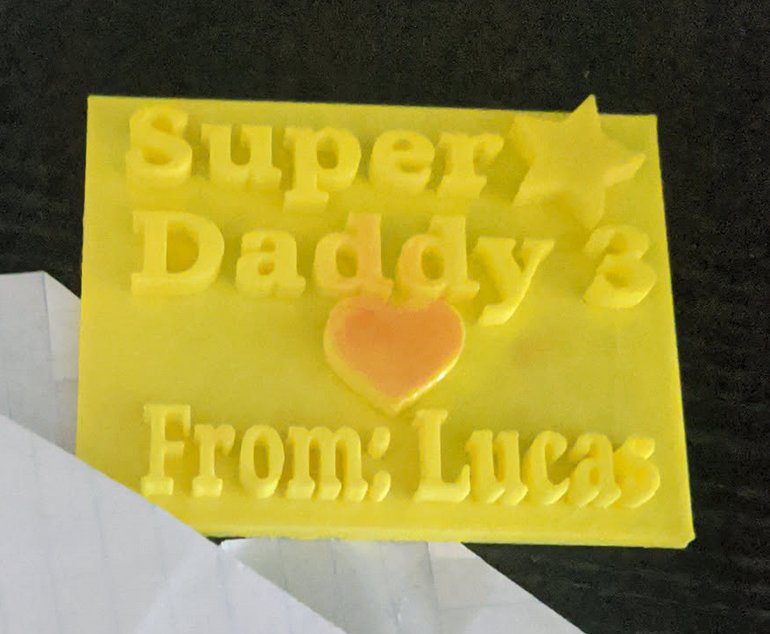
TinkerCad: Super Daddy 3 <3
My son made this one in his Maker Space class in school and modeled it after Super Mario Bros. 3. He knows it’s one of the best games ever and is also one of my personal favorites. It was very cute that he thought of it and used Tinkercad to print it by himself. It’s also amazing how schools have a Maker Space now. When I was a kid, we had one Apple II in the back of the class and we had to be a good student to use it. So obviously, I rarely had a chance.
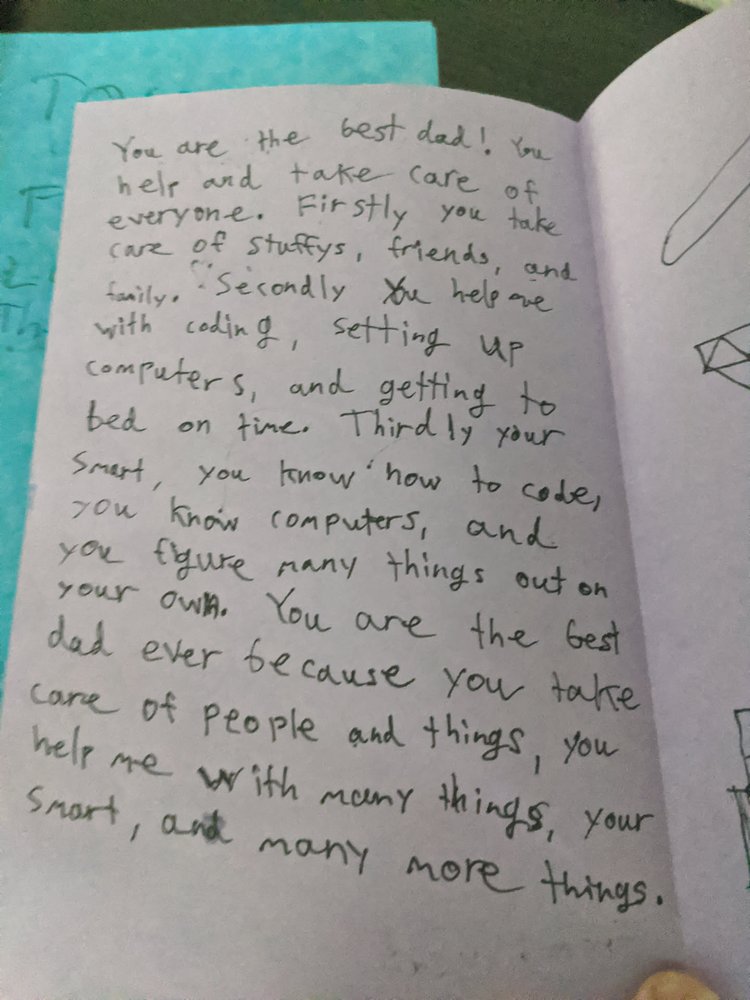
Cards from the kids
I have the two cutest and sweetest kids in the world. They’re the best things to happen to this underachieving moron. I don’t know how I got so lucky.
In other news, I had an MRI on my head last week. (If you’re new here: kidney cancer. Longer version here.) When kidney cancer spreads, it is most likely to continue on to your lungs, brain, and/or back bones, so getting through this last scan was a bit of a rough one for a few reasons. If you haven’t had an MRI yet, it’s not easy or quick like a CT or PET scan. They strap you to a table, stick needles in your arms, give you hearing protection, and shove you into a very tiny tube. In the case of a head MRI, they strap your head down as well. If you’re at all claustrophobic, this will be your worst nightmare. The good news is that I’ve had plenty of them and know a few tricks not to freak the hell out. First off, close your eyes and mentally put yourself anywhere else, and don’t open them for any reason. They say it only takes about 20 minutes, but it feels like so much longer. Bone scans are the only ones I’m aware of that put the sensor closer to your face. That one nearly touches your nose.
Typically scan results go to the doctor and they release it after review. If you see the results without a discussion, the results are good. However, if you get a phone call days later without seeing the results, then the opposite is true. Six days passed before I heard anything, and then I suddenly got a phone call while lying in bed. The oncology team at Kaiser SF called to let me know the results.
They were really busy that week and didn’t have the time to release it. The scans were clear and my brain is healthy.
Way to make that the best Father’s Day gift, just a week late.
Beacon
Every time my wife needs to get the kids' attention, she has two options: walk to the other side of the house or yell loud enough to be heard through numerous walls. Neither option is ideal.
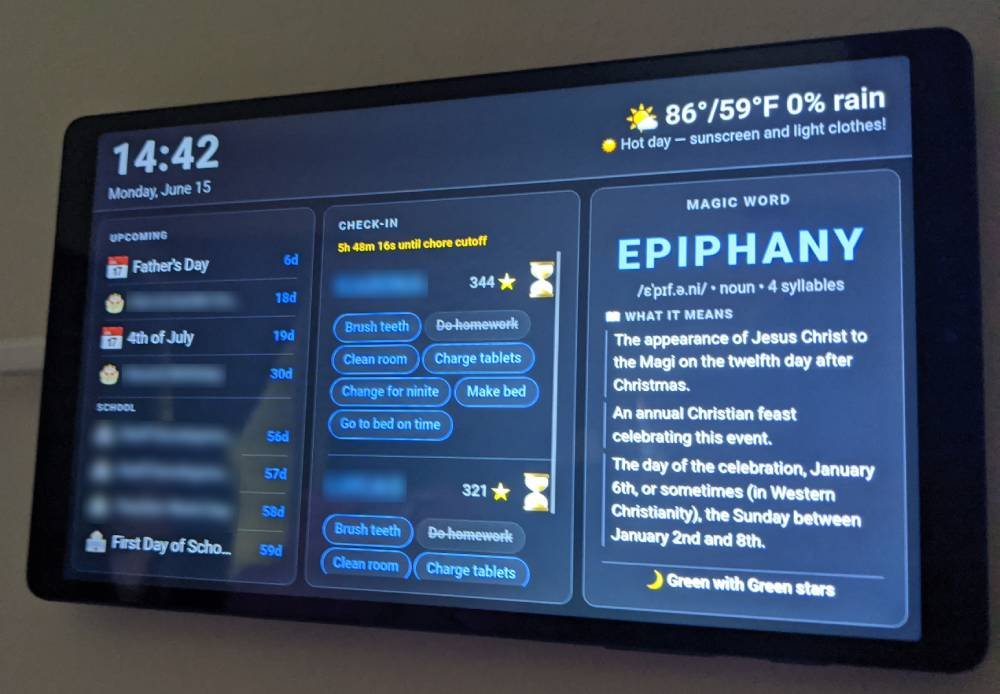
Kid's new dashboard & alert system
So I built a thing.
Since I don’t ever want the kids to have a phone or a smart watch, the solution would need to involve getting their attention and letting them know Mom needs something from them. It should also be customizable, scalable, and easy for kids to use.
My first plan was to build a custom 3D printed box with a speaker, some LEDs, and an arcade button. The light and sound could get triggered by Mom (TBD) and the kids could ack it with the button. If the kids didn’t respond, it would escalate by a repeated alarm that was louder a few minutes later. It’s possible, but doesn’t exactly solve my problem efficiently.
What color LED would mean what?
Do the kids need to memorize a color chart?
Do I need to hard code color meanings?
Would colors exclusively relate to urgency?
Would the speaker play pre-recorded messages or an alarm?
How would Mom trigger the alert? How would she be notified they heard her?
There were a lot of questions still to be answered. If we added an LCD screen, that would address the message content. No hard wiring color codes and printing a cheat sheet for the kids. Although, I’d have to wire in a screen and drive it with a Pi Pico W, and those are 5x more expensive nowadays. I haven’t priced project screens, so who knows what that would set me back. That would also mean a simple 3D printed box would no longer be simple. It would need a decent power supply with additional wiring and figuring out pixels and message scaling.
The trigger and ack part, at least, was already solved. Rooms, our Discord replacement, could handle that. Getting from Mom’s phone to the kids' ears was still the problem.
Rooms: Trigger a kid alert
There was another option: tie notifications into their laptops, tablets, and Nvidia Shield. The message could hit them if they were using either of the three, but it would be a cacophony of noise if all of those were in their room at the same time. If one was on the other side of the house, others would be annoyed by the alarm noises. It’d be like how Apple users get a phone call and every device in the house goes off. That situation is worse when there are older Apple users living with you because their notification volume is pegged at 100%.
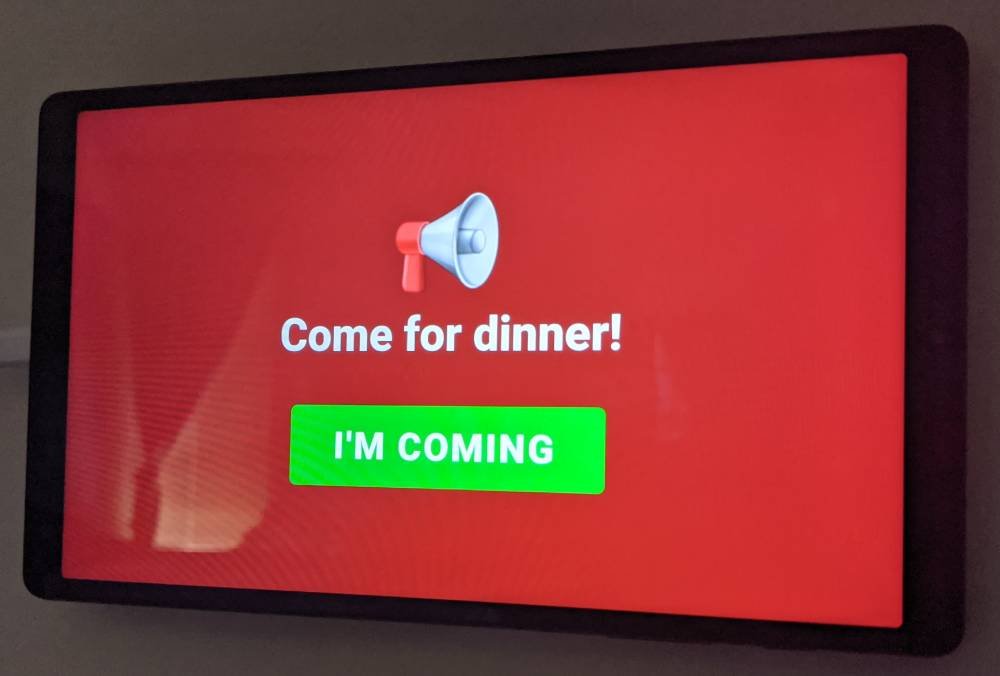
Then it occurred to me that we have old Android devices. My kids both had Samsung Galaxy A1s and they were in good working condition. All it needed was a browser, an always on screen, and WiFi. We could build the logic and the APIs on a locally hosted webpage and customize it however we see fit. Rooms can send a message through a simple /kids command, the site would pop up with the message, an alert sound and a button to confirm, then the kids could tap the tablet screen to ack. It’s perfect and I don’t need to build something from scratch or buy expensive 2026 hardware. Plus, if the tablet fails, we can easily replace it with another one and load the web page independently. The tablet battery doesn’t even need to be good. It could be plugged in all the time.
Dashboard alert with ack
The project went from start to v1.0 yesterday afternoon. The kids chose what app connections they wanted, how it looked, and they’re busy beta-testing it this week. It’s similar to my dashboard, but this version is so much more capable. It has local time, weather, their school calendar, a family calendar, a countdown to upcoming events, their word of the week (I haven’t posted about that one yet), and nightlight star colors. They can check their nightly chores app right from the screen, with a countdown to bedtime, and of course it receives Mom’s alerts.
It’s a simple solution and the kids are loving it. Not bad for a quick weekend project.
Weather
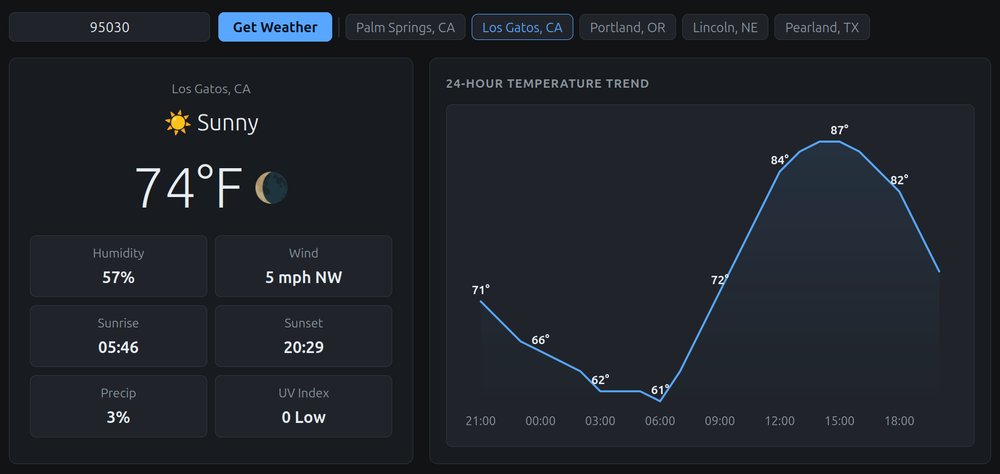
Weather: Turn on
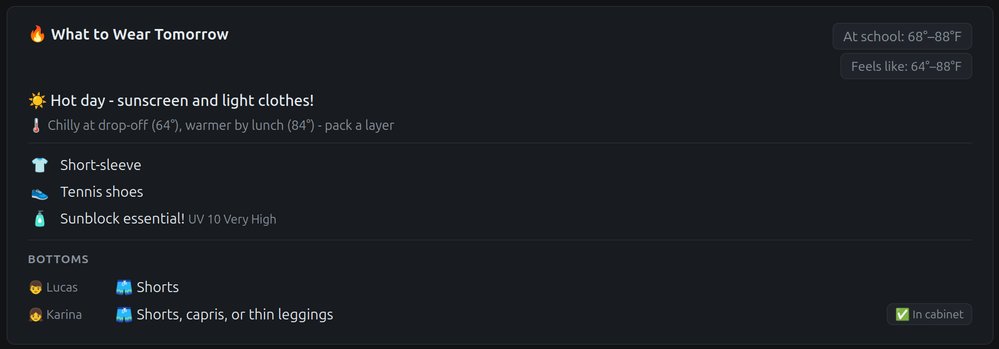
So I built a webpage that tracks the weather. Its simplicity makes it beautiful. It knows what the weather is for the week and highlights tomorrow’s forecast with precipitation, UV, and temperature details for when the kids are dropped off and picked up from school. At the bottom of the page it recommends to our kids what they should wear so there’s no confusion or delays getting ready. It even has an API so other apps like our new Discord chat replacement1 can connect to it. That way, our kids don’t need to ask us every night. They can find out themselves by asking our chat bot or simply visiting the weather page.
Weather: Kids clothes choices
My son was easy to solve for, as our clothes are based on function rather than form. It’s trivial for him to choose between a Mario or a Minecraft shirt. However, my daughter has a “too complicated wardrobe” and cannot be solved for - according to my wife. I feel that anything that has an objective solution, based on information as simple as weather, has a logical answer. Making messy things clean and efficient is what I do.
Let’s walk through the nightly process for her so you know what I’m talking about here: Daughter doesn’t know what to wear. She asks mom. Mom looks up weather details on Google or whatever. She says out loud what tomorrow’s magical weather number is, like “74”. She’ll then say “it’s nice, wear {clothes}”. This seems like the mom brain calculator can easily be replaced with a script, but maybe I’m missing some magic that cannot be replaced by JavaScript.
Perhaps if I inventory everything that is clean and folded, along with every color and style, and cross-reference with whatever fun theme they’re having at school that day…
That sounds exhausting. Maybe my wife’s right. I’ll just let the girls be girls. ¯\_(ツ)_/¯
So there’s a large NAS in my closet that is full of FLAC files and an install of Navidrome on it. For those of you that haven’t played with it yet, Navidrome is an open-source music library manager. The library continually grows as I discover new music. The problem is that Navidrome’s default web app isn’t very good. Playback breaks and the UI is clunky to use since it’s through a browser session. Ideally there should be an app that plays my music on the phone when I’m out, on Android TV when sitting around, and also in the car with a fancy Android Auto screen.
The open-source options weren’t bad, but they all had limitations. If I wanted a feature, I was at someone else’s mercy to agree and add an update. Existing apps that came close either had a hidden paywall or missing features. So I built my own.
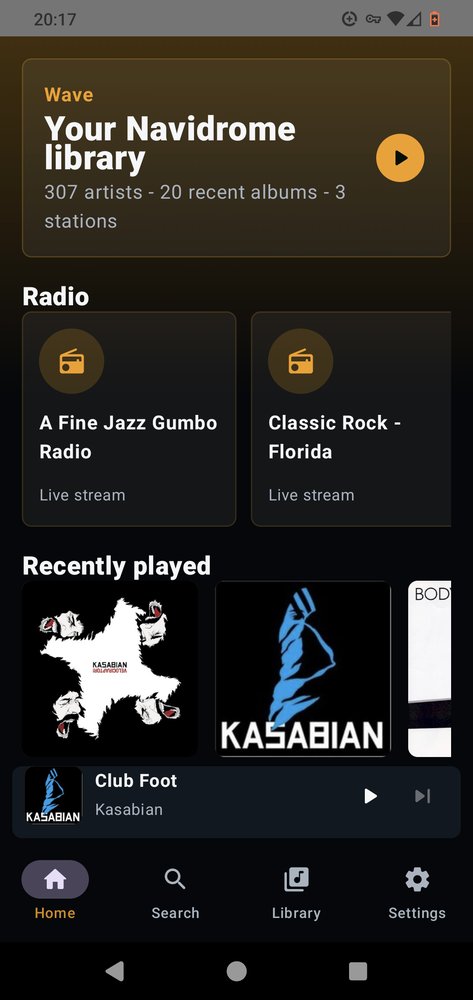
Wave main page with Yellow accent selected
I’m new to Android dev, so I used Codex to skip the part where I read 400 pages of documentation and fight with dependencies for days. What I actually like about AI is how flexible it is. It can be your teacher, your partner, or just the intern you hand the boring stuff to. I learned quickly to hand it all the boring stuff in situations like this. I’d rather spend my time on actual problem solving than on tedious details and system dependency management that I couldn’t care less about. I build, design, tweak, customize, and troubleshoot. AI handles all the leftover crap.
So this week, I made Wave - a Navidrome client for Android. It works on your phone, your TV, and in your car. It’s simple, lightweight, and streams directly from my music library. For Android TV, I am trying to incorporate projectM (similar to Milkdrop) visualizations, album artwork, and will eventually pull in music-focused APIs for band pictures, lyrics, backstories, related artists, top songs, and auto-generated playlists. The possibilities are endless when you build your own stuff.
AI gets a lot of hate right now with the data center build-outs, energy consumption & environmental impact, increased hardware prices, and the potential job losses. That’s all real and worth considering, but it’s also a really neat tool. If you’re passionately against it, just be aware that It’s not going anywhere. We’re currently watching massive corporations playing musical chairs over something potentially worth trillions. The spending is endless and nobody knows yet if the math works out, but that’s their problem. In the meantime, I’m going to use AI as much as possible.
Whenever a new tech comes out, the first few years are golden. When WiFi was first made commercial and people were putting it in their homes, it was the perfect time to get into network security and wardriving. Those were some fun years. Now it’s boring and somewhat confusing as to what all the different 802.11a/b/g/x/ac/6/7/wtf options there are. This new AI generation feels the same way, but it’s only going to get more locked down and commercial from here. Let’s just hope whoever comes out on top doesn’t ruin all the fun (looking in Google’s buzzkill direction).
What I care about most is what it means for regular people. Someone with a great story and no budget can practically make an entire movie. Another average Joe with a unique problem doesn’t have to wait for a corporation to half-ass a solution, charge a subscription, harvest their data, sell it to whoever’s buying, and then quietly update the terms of service six months later. They can just build the thing and make it exactly what was needed. No spying, no ads, or any data-harvesting involved.
I honestly never thought I’d make an Android Auto app. Spending months learning the annoying details behind Android development sounds awful. I wanted a solution, built the way I wanted it, and ideally before losing sanity and interest. Codex handled the annoying parts, while I handled the parts that mattered. I still learned much more than expected, and the next app will start from a much better place.
That’s the part worth paying attention to. It’s not the corporate arguing, the shoving of AI into every nook and cranny, or the fact that you can’t buy RAM without selling your soul. The part where regular people get more control over their own stuff is the really neat part few of us are paying attention to.
Switching gears now, I’m using Twitter(X) and social media less and less. The value just isn’t there. One major problem is that it was the only way readers could reach me, so I’ll need to come up with another method that doesn’t need aggressive micro-managing. If you have any ideas, let me know.
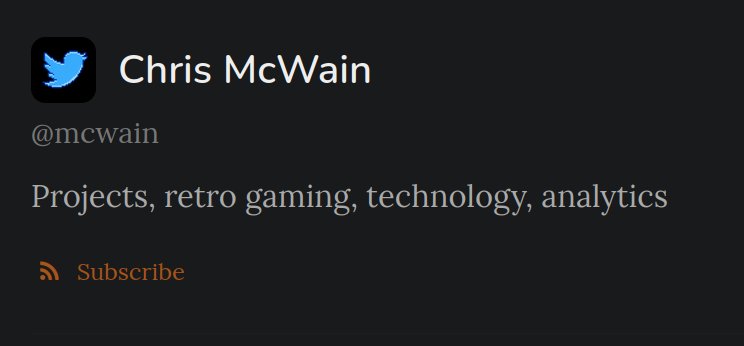
Site Update: Working with the new Stream section has got me focused on keeping my content here and away from massive, data-harvesting companies. Plus it’s fun. I just added an RSS XML feed if you dare to subscribe. It’s much more “high-flow” than my long form posts. You are warned.
The top of the /Stream section with RSS feed and SNES-like Twitter bird
Privacy update: I removed all unnecessary external dependencies like Google fonts. Now the only tracker allowed on this site is Cloudflare, but that’s because they host the cache, proxy, and AI scraping filters.
Last thing: Mark now has Hugo blog automation that’ll make posts much less tedious to make, so expect more updates from me.
Fancy new Hugo button in Mark
Until next time, Cheers!
Pay for Twitter? No thanks!
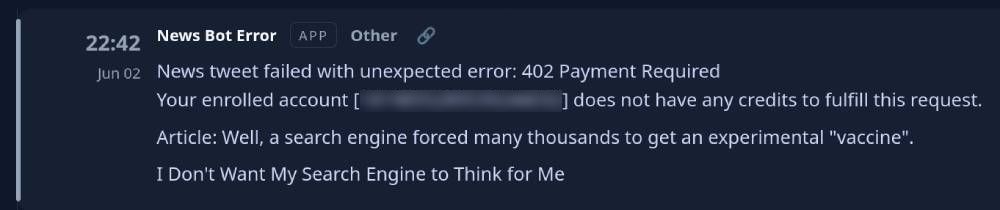
I was alerted by an API failure that Twitter (X) recently removed their free tier for bot interaction. These bots have been running for a long time now, sharing random nonsense like what movies we’ve been watching, what retro video game achievements I score on the pooper, and if there are any interesting news stories worth a conversation.
API error message when I ran out of credits
Not only did they remove the free tier, but they charge a pretty hefty amount for posts. For example, tweeting 41 times with a URL attached cost me over $7.50 - hardly worthwhile for silly little updates. So, like every other situation where I don’t agree with the new terms & conditions, I built my own!
Bender Bending Rodriguez
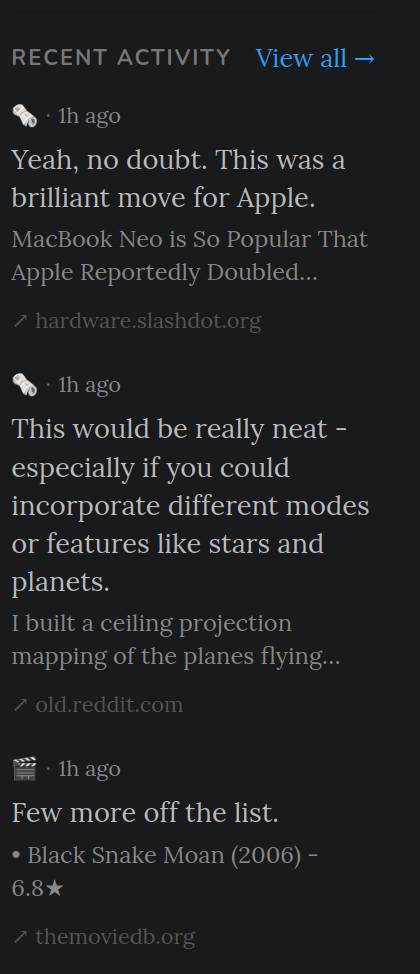
The question was “how?” Bluesky 🤮 has an API, as does Mastodon. I really don’t want to get anywhere near Bluesky, and Mastodon sounds like a massive hassle with a very limited audience, so I just built the feed into my own site (here). If all goes well, you’ll notice an entirely new section called “Stream”, along with the three most recent entries below the links in the sidebar.
← Look over there!
More features will get added over time like its own independent XML feed, image support, prettier styling, more bots, etc. For now the framework is there, the process is in place, and it looks good enough.
I solved the problem and it looks good. I’m not paying for the Twitter API, and this puts me back in control of my own data - despite the audience being considerably smaller than their 560M active users.
Everything is watching you and you pay for it
My phone is a Pixel 4 running GrapheneOS. It’s small, old, and does not have a hole in the screen. Almost everything runs through Cromite, a stripped-down privacy-focused browser. No Delta app. No McDonald’s app. No Instagram.
This isn’t me selling minimalism as a lifestyle. However, it’s slowly becoming the only sane response to what these things actually do.
Apps don’t exist to make your life easier. That’s only what these companies sell you. You are the product. They collect your location, contacts, usage habits, network details, and a full inventory of every other device on your wifi. Install enough of them and you’ve handed over a complete picture of how you live, where you go, and who you talk to.
Roku is the worst
I watch my firewall logs. Every few minutes, my Roku tries to phone home. Not occasionally. Constantly. It knows what’s playing, even when the source is my local Jellyfin instance serving my own files over my own network. It scans the network and catalogs every connected device’s name, type, history, and location.
Their app store is locked. You can’t install modified apps like SmartTube or SoundTV. You’re stuck with the stock versions in their store. Roku’s business model depends on knowing what’s on your screen at all times. They built their TV and media players around that.
This isn’t limited to Roku. All “smart TVs” and media players do the same thing.
Cars track us and charge monthly for the privilege
The Hyundai Santa Fe we just bought comes with a service called Blue Link. You need it for things that were standard on cars a decade ago - like remote start and trunk release. The app tracks your location, speed, and driving habits. Similarly, Nissan’s listed “sexual activity” as a data category. That’s not a joke. It’s in their own privacy policy.
The destination for all this data is insurance companies, who buy it cheap and use it to raise your rates. Brake hard twice a week? Rate increase. Drive surface streets instead of the freeway? That’s a 1.1x risk multiplier. They now have a spy inside your car. You agreed to it so you can open your trunk with your phone.
The next step isn’t hard to see. If cars don’t go fully subscription, they’ll limit how and where you can drive. The infrastructure already exists. All it takes is the right regulation. Driving restrictions for climate credits, congestion pricing, and regional lockouts are inevitable. Electric cars are on the grid, which means they can be managed from the grid. Tying charging to usage quotas isn’t far-fetched. It’s how internet and mobile data caps became a thing.
The phones
The iPhone 17 Pro Max starts at $1,100. It has a giant hole in the screen. Apple calls it the Dynamic Island, because they’ll give anything a cute name and market the flaw as a feature. It’s a 6.9-inch glass slab that costs more than a car payment and needs to charge every night.
My Pixel 4 fits in my back pocket and has no hole. I’m not interested in the newest devices with an always on face camera, the glass back waiting to meet concrete, hardware designed to be replaced in two years, lack of repairability, or the massive tablet size that won’t fit in a pocket.
The world is moving toward a smartphone only infrastructure with QR code menus, mobile payments, and digital IDs. We’re all watching it happen and cheering it on. I’m still not spending $1,100 on a giant phone with a hole in it.
The anxiety machine
I know people with $800 smartwatches. The watch exists to eliminate the distance between them and their phone notifications. The notifications are the problem.
The morning starts with a phone screen flashlight to the face, catching up on emails and messages that came in overnight. Then frequent coffee breaks, a full day of meetings, messages, and an unbroken stream of alerts on both the phone and the watch. Finish up with anxiety meds, melatonin, and wine to calm down at night, then two hours of scrolling before bed. Wake up and repeat.
They built their lives around products engineered to be impossible to quit.
The most profitable business right now is the most addictive one. TikTok, Instagram, algorithmically optimized outrage news. These devices are the delivery systems for all of it.
There’s a reason shower thoughts are still a thing. The shower is the only place most people go without a screen. Ten minutes of actual quiet, and the brain starts generating ideas again. That’s what the brain does when you stop flooding it.
Smart glasses
The next product category is smart glasses. $1,000+ devices that push the notification stream from your wrist directly into your field of vision. No more glancing down. The feed is always there, overlaid on top of the real world.
Driving is going to get interesting.
My approach for now
There’s a used Pixel 9 mounted under the dash of my car. It runs Android Auto, has no connection to my identity, runs only open source apps, and costs about $15 a month for cell service. It’s limited to maps, podcasts, and music. That’s it.
All-in-one devices are a bad idea. The phone in your pocket isn’t just a phone. It’s an always on data collection device with a camera and a microphone that goes everywhere you do. The only real answer is to make it do less, or to give each function its own isolated device with no access to the rest of your life.
If the supply of Pixel 4s dries up, my daily driver will be a burner.
Self-Hosted Appstravaganza!
The last few weeks have been great for personal productivity. Self-hosting has grown from a hobby into a full-blown passion, and from that, I’ve developed a handful of personal web app solutions. I’ll walk through a few of them below.
You may have seen this one before, but it’s gone through so many iterations that it’s practically unrecognizable now. It’s cleaner, more professional, and loaded with new user enhancements - including a customizable workout feature. If you want to do a specific set of exercises, just select them and hit start.
The app counts down, gives audio cues when the next set is coming up, and flashes the screen as a visual indicator. This solved a treadmill problem I had - when I’m zoned out or watching Mike Matei on Twitch, I often miss when my timer ends.
It’s free to use with the link above. I’m not going to track you. If you find it useful, let me know.
Prepped.
If you scroll down a bit on this page to an earlier post, you’ll find “Prepped,” my weekly meal-prep guide. It looks the same as before, but there have been a lot of backend improvements - which I’ll cover here in a moment.
Ping.
Then there’s Ping, my Slack replacement for personal updates. I wrote a ton of bots that perform various status checks and report back here (and to my self-hosted push server). My phone gets notifications without depending on Google’s invasive Play framework. That’s huge for privacy and reliability. This dashboard keeps me informed of most everything I’m interested in.
Echo.
My tt-rss Docker container recently died, leaving me with a news-shaped hole in my life. I tried to repair it, but it refused to spin back up. After testing every RSS reader listed on Awesome-Selfhosted, I found each had its own flaws - too resource-heavy, clunky UI, or unnecessary features. So, like always, I built my own. I knew exactly what I wanted and cut out the fluff.
It feels so free to control your own tools. It’s easy to tweak features and address bugs since we own the source. My reader is simple but solid, and I’ve been collecting ideas for future sprints in my task manager - which brings me to…
Focus.
Focus keeps improving because I can’t leave it alone. There’s always some detail to polish or logic to refine. It’s nearly ready to replace TickTick. I finished building the date-parsing system and added several small quality-of-life updates. Since it’s my app, I can make it look and behave exactly how I want. No user complaints or unwanted features here. If something needs changing, I just modify it myself.
One of TickTick’s biggest flaws is its weak API. I fought too long trying to get data out of it. Focus fixes that by having its own API, which lets all my other apps communicate directly with it.
HoneyDo
Take HoneyDo, for example - my wife’s new task-request app. It gives her a quick, easy way to send requests to me that won’t get lost or forgotten. When she adds a request, it appears instantly in Ping, triggers a push notification on my phone, and creates a new task in Focus through the API. It even includes priority and details. Prepped does something similar when I click “Copy Grocery List”. It generates a grocery task in Focus and updates my markdown notes from my self-hosted instance of FlatNotes. The whole system is interconnected and you can feel the flow. I hate the name “HoneyDo”, but it was intended to be as corny as possible.
All of these apps are mobile-friendly, encrypted behind a proxy, and protected by strict firewall rules. Each lives on its own subdomain - for example, https://{app}.{domain} where app might be rss, tasks, ping, webhook, or push.
They also look great on my phone, complete with custom icons. You’ll notice one called Mint - my stock dashboard. It’s doing a significant amount of work behind the scenes, so I’ll keep this one brief.
Mint.
The dashboard is organized into sections: Crypto, Growth Signals, Profit Opportunities, Top Holdings, Prune Candidates (with Sharpe ratio and volatility scores), Performers/Underperformers, and “All”. Each has logical icons: colored dots for performance, flames or rockets for potential winners, and trend icons for tickers to grab or sell.
Hover over a ticker and you’ll see RSI, PEG, SMA, analyst target price averages, and the latest headline for that stock. Clicking on the ticker opens that stock on my broker and clicking on the arrow next to it opens all related details on Finviz. There are also incredibly handy buttons set to open my custom stock screeners. Data comes from multiple sources and compiles into one clean dashboard. Every market open and close, alerts get sent to Ping, along with other major ticker and crypto updates throughout the day.
Wellness Tracking
This one’s a combo app - one writes while the other reads. The page has sections for calories, exercise, and health metrics. Whenever I eat something, weigh myself, take my blood pressure, or work out, it all gets logged. The original version was written in great detail on this post, though I’m debating whether to update that page.
Every minute, the dashboard updates from my health database and generates visualizations of my overall stats. It now pulls insights from the Oura API - since their app interface is total ass. My Magic Dashboard also includes a custom section showing my calorie and protein intake, so I don’t even need to open my phone or computer to check. There’s more below both of these screenshots, but I didn’t want to flood this post with them. I’m sure you get the idea. One cool feature is that the workouts hit the Twitter API and tweets the activity.
This is another that’s free to use with the link above. It’s a markdown note app that’s incredibly quick to load and handy when you need to get an idea down. The storage is local to your browser and my server doesn’t see any of it. It’s completely private and secure over https. If you know how to use markdown, it’s easy to format a document and export it to md or html. You can also hit the preview button to see how it’ll look. It’s mobile friendly and I find myself using this frequently to get ideas down.
That’s all I got for now. I’m going blind, have a headache, and should probably step away from the computer for a while. Hopefully this was entertaining and gives you some future project ideas. Feel free to reach out with comments, questions, or projects that you’ve worked on. You can reach me via the Twitter link on the sidebar.
Managing Nutrition Just Got Much Easier
There’s so much I want to share with you: setting up network-wide ad blocking, Cloudflare Tunnels, custom 3D prints, my Halloween costume, self-hosting a Google Photos replacement, task organization, smart goggles, self-hosted calendars and contacts, and so much more.
But today’s project is top of mind and pretty exciting - making weekly meal preparation awesome!
Why I Ditched Factor75
Up until last week, I was getting meal deliveries from Factor75. It was the perfect service for a while because it:
Cost about $120/week for eight meals
Has a large variety to pick from
Included nutrition labels for easy tracking
Allowed me focus on work without having to stop and cook
Then the problems started. Over the last three weeks, I had two failed deliveries. One box never arrived, and the next one was delivered down the street. By the time I managed to reach it, it was soaking wet and questionable.
No matter how convenient the meals are, if I can’t rely on them for the week’s food planning, it’s not worth using.
As usual, I decided to address the issue my own way.
Building My Own Meal Prep “App”
I built a small web app with a Python backend that reads from two JSON files:
one maintains a list of ingredients
the other combines those ingredients into complete meals
This modular design allows for overlap and re-use of ingredients. For example, selecting both Chicken Pot Pie and Thai Green Chicken Curry automatically adds two portions of chicken plus all the necessary ingredients for each dish.
components.json
{"id":"cmp_mushrooms","name":"Cremini Mushrooms","category":"fresh_quick","storeSection":"Produce","portionName":"cup, sliced","portionSize":1,"caloriesPerPortion":15,"proteinPerPortion":2,"isBatchable":false,"prepNotes":"Roast or sauté."},
{"id":"cmp_cavatappi","name":"Gluten-Free Cavatappi","category":"on_hand","storeSection":"Bread & Grains","portionName":"cup cooked","portionSize":1,"caloriesPerPortion":200,"proteinPerPortion":6,"isBatchable":false,"prepNotes":"Boil to al dente."},
{"id":"cmp_almond_milk","name":"Almond Milk (unsweetened)","category":"on_hand","storeSection":"Dairy & Eggs","portionName":"cup","portionSize":1,"caloriesPerPortion":30,"proteinPerPortion":1,"isBatchable":false,"prepNotes":"Use in mash/sauces."},
{"id":"cmp_black_beans","name":"Black Beans (canned)","category":"on_hand","storeSection":"Snacks/Pantry","portionName":"1/2 cup","portionSize":0.5,"caloriesPerPortion":114,"proteinPerPortion":7,"isBatchable":false,"prepNotes":"Rinse for bowls."},
As you can see by the examples above, both ingredients and meals are easily updated and managed.
Efficient Grocery Lists
At the top of the grocery section, there’s a Copy Grocery List button. This button will take your list, format everything in Markdown, and sort ingredients by store section. This allows for easy pasting directly into my new self-hosted notes app (which is now added to my list of things to talk about). Otherwise, local storage will maintain your list while you shop.
AI as the Ultimate Coworker
AI was heavily involved in building this. Each model has its quirks and specialties, but together they can make for fantastic coworkers. They feel like having a Mr. Meeseeks button at my side.
I’ve been coding and scripting basic stuff for so long that much of it feels like tedium. Now, I can have a bot pore through files and fix problems while I focus on higher-level logic and design. They can behave like a project manager or a UI / UX expert. OpenAI Codex was used during development, Claude Sonnet cleaned and polished the UI, and Google’s Gemini struggled to give me a list of names for the project. It’s okay buddy. You’re important too.
It honestly feels like working with a large team as my productivity has shot through the roof. What an incredible era for our kids to grow up in!
What’s Next
The final recipes and nutrition section still needs work. It’ll eventually include step-by-step instructions, substitution tips, and photos. I’ll do that in a later sprint.
Factor75 won’t be delivering to our house anymore, so next week is our first live-fire exercise. I’ll report back once I see how it performs with my weekly workflow.
Cross your fingers.
Two Webhooks Are Better Than Four!
Recently I’ve been posting frustrations about Slack. It works fine as a free chat app, but the constant UI changes, pop-ups, ever-increasing limitations, push notification issues, and lack of customization really turn me off. It meets the needs of many users and is a solid solution overall, but I just can’t do it anymore.
Some fellow internet nerd mentioned Mattermost. You can self-host it for free, and it’s marketed as a drop-in replacement. So I gave it a try… and it turned out to be yet another “fine enough free chat app.” None of these tools really solve what I actually need. My goal really isn’t two-way conversations to keep teams in sync - it’s pretty much “just tell me what I need to know.”
So I built it.
You don’t realize how hard it is to move away from a system until you’re in the middle of it. It’s like moving into a new house: so many things happening at once that you constantly ask yourself, “is this really worth all the time and headache?” At that point, it doesn’t take much to give up and stay where you’re comfortable.
For me, Slack had one key ingredient: Webhooks. A webhook is basically a lonely server that spends all day waiting for someone to talk to it. When someone shouts its way, it replies, “Yes! You! I hear you!” That response can trigger all kinds of cool stuff. Leaving slack means leaving webhooks. AI and I (say that 10x fast) built a webhook server replacement (let’s call him TJ Hooker) that listens 24/7. When I tell a script to message TJ, the two do a handshake. Once the super-secret spy stuff is done, TJ writes the message into his ledger.
Here’s where it gets fun, and also why I didn’t sleep much last night. I wrote a second script that checks TJ’s ledger and generates an HTML page. It sorts, colorizes, adds formatting, and categorizes messages into topics with emojis and markdown support. The page refreshes every minute and is accessible behind Cloudflare Tunnels since it’s all running on my local server. It’s mobile-friendly and has a clever custom domain name with security stuff at the front gate. This isn’t a how-to, so we’ll only stick to the fun stuff here.
The next step is adding webhook configs into all my scripts. Tedious, but it’s also an opportunity to add features and clean house. After that, I can focus on formatting incoming messages and tweaking tf out of this 100% customizable dashboard.
One interesting thing I learned today: services like IFTTT and Zapier actually charge a premium just to send webhook requests. That’s a real bummer because I’ve been using Zapier to track when specific Twitch users go live. Looks like I’ll need to make a script using Twitch’s API to replace that now, too.